
Social media managers frequently battle the disruptive friction of constant tab-switching just to format simple, engaging visuals for different platform dimensions. Traditionally, teams have relied on standard creative pipelines-such as external stock photography databases or back-and-forth communication with dedicated design departments-to bridge this asset gap. However, embedding visual creation directly into your publishing workflow grants immediate operational efficiency, giving you creative autonomy at the exact moment of scheduling.
To manage expectations, it is crucial to stipulate that these composer-level utilities are engineered for agile, day-to-day content scaling rather than replacing high-end, bespoke brand agency design. Yet, with concrete solutions like the native Buffer Image Generator and the seamless Canva Integration, marketers can produce polished graphics on the fly.
This article evaluates both design pathways within the Buffer Composer, comparing their features, ease of use, and creative limitations to help you choose the ideal tool for your workflow.
| Factor | Summary |
|---|---|
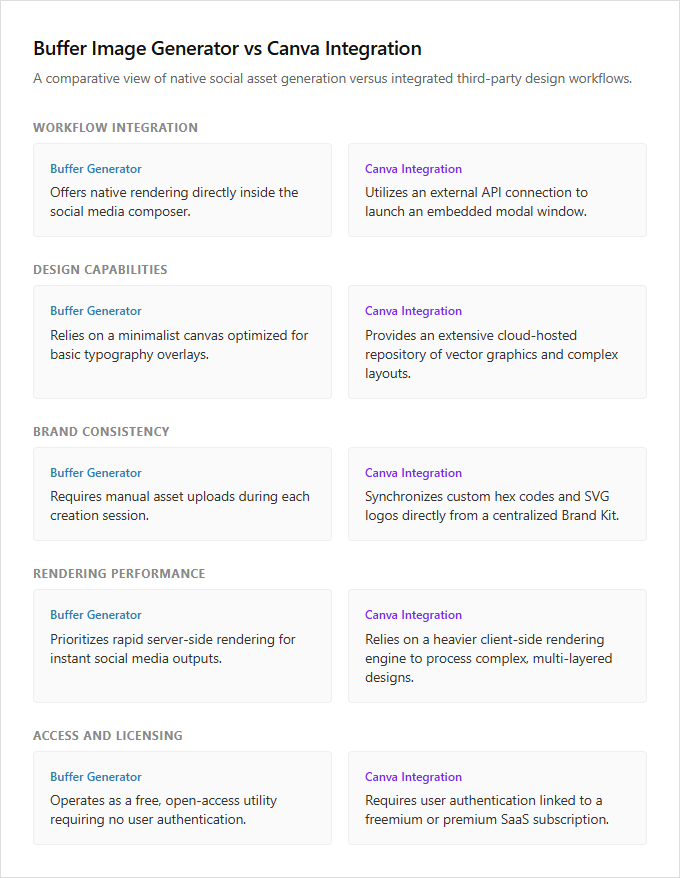
| Workflow Integration | While the Buffer Image Generator offers native rendering directly inside the social media composer, the Canva Integration utilizes an external API connection to launch an embedded modal window for asset creation. |
| Design Capabilities | Canva provides an extensive cloud-hosted repository of vector graphics and complex layouts, whereas Buffer's native generator relies on a minimalist canvas optimized for basic typography overlays. |
| Brand Consistency | The Canva Integration allows users to synchronize custom hex codes and SVG logos directly from a centralized Brand Kit, whereas Buffer's built-in tool requires manual asset uploads during each session. |
| Rendering Performance | The Buffer Image Generator prioritizes rapid server-side rendering for instant social media outputs, while Canva relies on a heavier client-side rendering engine to process complex, multi-layered designs. |
| Access and Licensing | Buffer's native tool operates as a free, open-access utility requiring no login, while the Canva Integration requires user authentication linked to a freemium or premium SaaS subscription. |
Native AI Diffusion vs. Canva's Vector Editor
Buffer's power tools offer two distinct pathways for visual content creation: native AI generation and the Canva integration. The native Buffer Image Generator utilizes advanced text-to-image diffusion models to facilitate synthetic asset creation. By converting descriptive text prompts into unique raster graphics directly within the scheduling interface, this tool bypasses the need for external design resources.
The Canva integration relies on a classic WYSIWYG vector graphics editor interface. This setup enables users to manipulate pre-designed templates, brand fonts, and vector elements using familiar drag-and-drop mechanics. While the native generator suits agile, concept-focused creators who require rapid, automated visual assets, the Canva integration is best for detail-oriented brand managers who need precise alignment and layout control.
Canva Integration vs. Native AI Generator
Buffer offers two distinct pathways for visual content creation: the native Buffer Image Generator and the integrated Canva tool. The Canva integration operates within an iframe modal embedded directly in the Buffer composer, leveraging the Canva Button SDK to allow users to design assets and import them seamlessly. In contrast, the native Buffer Image Generator bypasses third-party design interfaces, communicating directly with external generative AI APIs to produce images instantly from text prompts.
These architectural differences dictate the ideal workflow for different types of social media professionals. The native AI generator is perfect for rapid, prompt-based creators seeking instant, unique visuals, while the Canva integration suits brand-conscious marketers who require precise control over pre-established templates and asset libraries.
Canva's Brand Assets vs. Buffer's AI Prompts
Buffer provides two distinct pathways for social media asset creation. The Canva integration serves as a direct bridge to established brand identities, allowing users to instantly access cloud-stored brand kits, logos, and pre-approved templates. This workflow streamlines content production by leveraging existing design assets.
In contrast, the native Buffer Image Generator utilizes natural language processing (NLP) prompts to synthesize entirely new visuals from scratch. Instead of pulling from a library, users describe their creative vision in plain text, and the AI engine generates custom graphics dynamically.
The Canva integration is ideal for corporate marketers needing to maintain strict brand alignment, while the NLP generator is best suited for agile creators who require rapid, on-demand illustration without pre-existing design files.
Canva's Layered Editing vs. Flat AI Images
Buffer's integration with Canva provides a robust solution for brand-aligned visual creation. Canva excels by offering non-destructive, layer-based editing, allowing users to modify individual text elements, shapes, and assets at any point without degrading the design.
Conversely, the Buffer Image Generator utilizes artificial intelligence to produce instant visuals. These AI outputs are delivered as flattened raster files, which limits direct modification and requires manual post-processing in external software for any subsequent design alterations.
The Canva integration is ideal for detail-oriented designers who require precise, iterative control over brand templates, whereas the AI image generator best serves fast-paced content creators needing rapid, one-off conceptual graphics with minimal editing requirements.
Canva vs. AI: Client vs. Server Rendering
Buffer's visual creation suite offers two distinct technical approaches for content creators: the Canva integration and the native AI Image Generator. The Canva integration utilizes client-side HTML5 Canvas rendering, enabling instantaneous, real-time image manipulation directly within the browser interface. This client-side processing bypasses network latency, providing a highly responsive and interactive design environment.
The Buffer Image Generator depends on server-side GPU-accelerated inference to output visuals. This mechanism introduces a brief processing latency while remote neural networks synthesize the imagery from text prompts. The Canva integration is ideal for hands-on designers who require precise, manual control over layout adjustments, while the AI generator is best suited for busy marketers seeking rapid, automated concept generation.
Canva Aspect Ratios vs. Native Fixed Dimensions
Within the Buffer platform, choosing between the native Buffer Image Generator and the Canva integration depends heavily on your image scaling requirements. The Canva integration leverages customized aspect ratio presets designed specifically for various social media platforms, ensuring precise visual framing and brand compliance. In contrast, the native AI image generator operates within the structural boundaries of its underlying technology, limiting output to the fixed pixel dimensions of the AI model's payload.
This technical difference directly impacts design flexibility and layout efficiency. Social media managers requiring precise, platform-specific dimensions for multi-channel campaigns benefit most from the Canva integration, while rapid-prototyping marketers needing quick, concept-driven visuals without strict formatting constraints are best served by the native generator.
Canva's Cloud Saving vs. Buffer's Local Caching
The integration between Buffer and Canva leverages robust RESTful API endpoints, allowing users to sync and save their graphic designs dynamically to a secure cloud account for permanent accessibility. In contrast, Buffer's native AI Image Generator operates on localized session caching, storing generated assets temporarily within the active browser session until the user attaches the image directly to the publishing queue. This distinction alters how media is stored, retrieved, and managed during the scheduling process.
While the Canva integration establishes a permanent, reusable asset pipeline, the AI generator offers a lightweight solution for immediate, single-use visual creation. Digital marketers requiring collaborative, long-term brand asset management will find the Canva integration indispensable, whereas agile creators seeking rapid, disposable visuals for instant scheduling will benefit more from Buffer's localized AI tool.
Leave a comment