
Maintaining a consistent social media presence requires a constant stream of high-quality content, yet manually curating articles to keep your Buffer queue full remains an exhausting, time-consuming bottleneck.
Traditionally, managers rely on standard funding sources for their content pipeline-such as manual bookmarking, newsletter subscriptions, or basic feed readers-to keep their queues active. Automating this pipeline via RSS grants marketing teams hours of reclaimed time each week, ensuring a perpetually active feed without manual intervention. However, successful automation stipulates that you select the right tool logic; a poorly configured feed can easily spam your audience with irrelevant links.
For instance, top-tier digital agencies use native Buffer RSS tools or Zapier to seamlessly filter and queue industry-standard publications like TechCrunch or Harvard Business Review. This guide compares Buffer's native RSS integration against Zapier's multi-step RSS workflows, evaluating setup complexity, filtering capabilities, and cost to help you choose the ultimate curation engine for your brand.
| Factor | Summary |
|---|---|
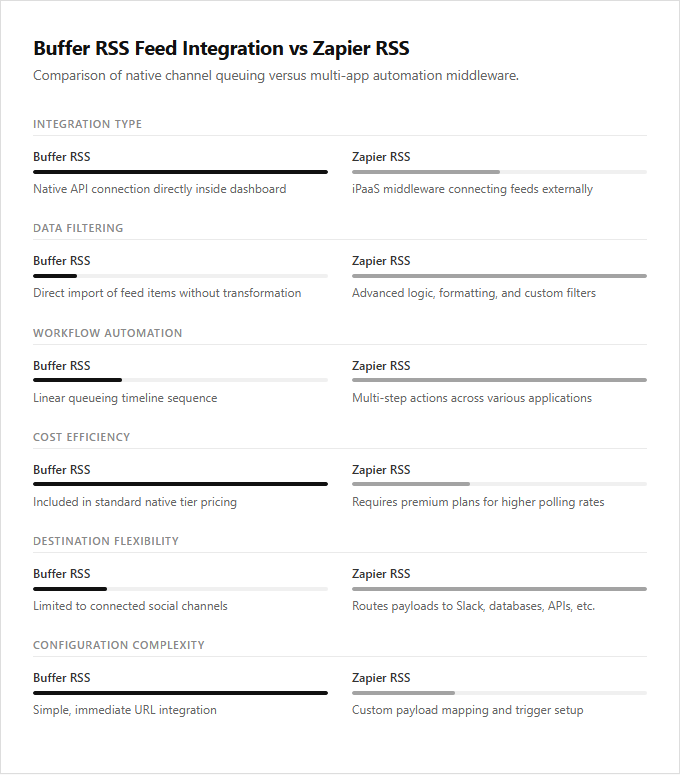
| Integration Type | Buffer RSS provides a native API connection directly within its dashboard, while Zapier operates as an iPaaS middleware to connect feeds to external destinations. |
| Data Filtering | Zapier RSS enables advanced data manipulation using conditional logic and filters, whereas Buffer directly imports feed items without transformation options. |
| Workflow Automation | Zapier supports multi-step workflows that trigger several actions simultaneously across different applications, whereas Buffer RSS operates strictly on a linear queueing mechanism. |
| Cost Efficiency | Buffer RSS is included within native subscription tiers, while Zapier may incur additional costs for premium plans to support higher polling frequencies. |
| Destination Flexibility | Buffer RSS only publishes to connected social channels, whereas Zapier can distribute the RSS payload to diverse API endpoints including Slack, databases, and email. |
| Configuration Complexity | Buffer RSS requires only simple URL parsing for quick setup, whereas Zapier offers a deeper learning curve to map custom webhook payloads and triggers. |
Native API integration versus multi-tenant middleware architecture
Buffer's native RSS feed integration operates via direct API connections, offering a streamlined, low-latency data flow within a single ecosystem. Because it bypasses third-party processors, this native setup ensures optimal data security, minimal synchronization delays, and straightforward configuration tailored specifically to Buffer's queue mechanics.
In contrast, Zapier RSS utilizes a multi-tenant middleware architecture to route content feeds. This approach introduces an intermediary abstraction layer that allows for complex multi-step workflows, advanced filtering, and cross-platform formatting before the data reaches the social queue. While this introduces minor processing latency, it provides unparalleled flexibility for multi-platform automation.
The native Buffer integration is ideal for social media managers seeking a fast, zero-maintenance setup to queue content directly, whereas the Zapier middleware is suited for systems architects and power users who require complex multi-app pipelines and custom data manipulation.
Webhook polling intervals versus fixed-cycle RSS synchronization latencies
Buffer's native RSS feed integration operates on fixed-cycle synchronization latencies. The platform periodically scans registered XML feeds at predetermined intervals to ingest new articles into the queue. This structured approach ensures stable, predictable queue management, though it introduces a systemic delay between content publication and social media scheduling.
Zapier RSS integration bypasses these fixed cycles by utilizing high-frequency webhook polling intervals. Depending on the plan tier, Zapier actively monitors the feed and triggers actions within minutes of a new publication, pushing data to Buffer almost instantly. This method minimizes synchronization latency but requires managing an external, multi-app connection.
Buffer's native tool is best suited for patient content curators seeking a consolidated, low-maintenance scheduling setup, whereas Zapier caters to agile digital marketers who demand immediate, real-time syndication across multiple channels.
Boolean conditional logic filtering versus basic keyword inclusion rules
Buffer's native RSS feed integration offers a streamlined approach to social media syndication by importing articles directly into your sharing queue. This built-in tool relies on basic keyword inclusion rules, allowing users to automatically draft or publish posts containing specific, predefined terms. It is an efficient, low-maintenance solution for straightforward content curation.
Conversely, Zapier's RSS integration introduces advanced multi-step workflows utilizing complex Boolean conditional logic filtering. Instead of relying on simple keyword matches, users can construct intricate "AND/OR" parameters, filter by multiple authors, or exclude specific phrases entirely before any content is queued. This granular control ensures that only highly relevant articles pass through your automation pipelines.
Buffer's native tool is ideal for solopreneurs seeking simple, set-and-forget automation, while Zapier appeals to enterprise marketers requiring precise, highly filtered content curation across diverse sources.
Custom XML schema parsing and dynamic JSON payload mapping
Buffer's native RSS Feed integration offers a streamlined, turnkey solution for automated content sharing. It excels at parsing standard feed formats to queue posts directly into social channels. However, its native parser lacks the flexibility to process highly customized XML schemas or perform dynamic JSON payload mapping, restricting users to rigid, predefined structures.
Zapier RSS provides robust middleware capabilities to bridge this technical gap. It allows users to ingest complex XML structures, parse custom namespaces, and dynamically map data to JSON payloads before dispatching it to Buffer. This developer-friendly approach enables advanced data transformations, conditional filtering, and precise field formatting.
Buffer's built-in tool suits social media managers seeking rapid, zero-maintenance curation, whereas the Zapier pipeline is ideal for technical marketers and systems integrators requiring granular control over non-standard data schemas.
OAuth token authentication management versus direct-channel credentialing
Buffer's native RSS feed integration relies on centralized OAuth token authentication management. This protocol securely links the RSS feed directly to pre-authorized social media profiles within a single, unified environment. By leveraging OAuth tokens, Buffer minimizes credential exposure, allowing users to authorize content distribution without sharing sensitive passwords across external platforms.
Zapier RSS integrations employ direct-channel credentialing to bridge disparate applications. This method utilizes specific API keys and distinct account permissions for each connected endpoint, enabling highly customized, multi-step automation workflows. Buffer's native setup is ideal for social media managers seeking streamlined, secure content curation, while Zapier's approach best suits systems administrators requiring complex, multi-platform data routing.
API rate limit thresholds and automated task quota consumption metrics
Buffer's native RSS Feed integration operates within the platform's standard API rate limits, importing content directly into the queue without consuming external task quotas. This native connection provides a cost-effective pipeline for automated syndication, as feed updates are processed internally without incurring per-post execution fees. Users maintain consistent queues without worrying about exceeding monthly automation budgets.
Zapier RSS utilizes a middleware model where every imported post consumes a task against your monthly Zapier quota. This system is subject to Zapier's tiered polling intervals and API rate limits, which can rapidly exhaust starter plan thresholds during peak content cycles. High-volume publishers seeking simple, budget-friendly queue curation benefit most from Buffer's native tool, while advanced marketers requiring multi-step filtering and complex conditional logic find Zapier more suitable.
Sequential queue slot allocation versus programmatic multi-channel routing
Buffer's native RSS feed integration operates on a sequential queue slot allocation system. When new articles are detected in the feed, they are automatically placed into the next available slots within a pre-defined posting schedule. This approach maintains a steady, predictable publishing cadence, distributing content evenly across connected social profiles without requiring manual intervention for timing.
Zapier RSS utilizes multi-step workflows to enable programmatic multi-channel routing. This method parses incoming feed data to trigger conditional actions, allowing users to instantly syndicate customized updates across diverse platforms using advanced filtering and branching logic. Buffer's sequential queue suits solopreneurs seeking a steady, low-maintenance content drip, while Zapier's programmatic routing is ideal for technical marketers needing complex, multi-platform syndication workflows.
Leave a comment