
Managing audience interactions across multiple social media accounts often leads to fragmented workflows, missed notifications, and delayed response times. Constantly hopping between native platform tabs to address community inquiries drains valuable marketing resources and slows down team momentum.
Traditionally, organizations rely on native platform inboxes as their standard resource for managing customer touchpoints. While these built-in tools offer basic utility, they quickly become inefficient as engagement demands scale.
This is where the Buffer Engagement Tool bridges the gap, granting social media teams a centralized command center that streamlines response times. To manage expectations, it is important to note that this consolidated approach requires initial API authorization for each channel. However, once established, it seamlessly pulls comments and queries from platforms like Instagram and Facebook into one clean dashboard.
In this article, we compare Buffer's Engagement Tool directly against native platform inboxes, examining key workflow differences, response-time impacts, and how to optimize your brand's community management strategy.
| Factor | Summary |
|---|---|
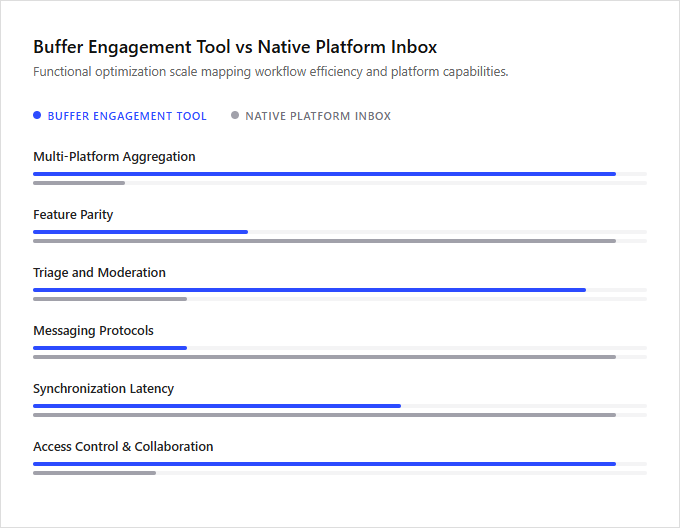
| Multi-Platform Aggregation | Buffer aggregates engagement feeds across multiple networks into a unified dashboard, whereas native inboxes require manual context-switching between siloed platform-specific consoles. |
| Feature Parity | Native platform inboxes support full proprietary features like stickers, voice notes, and platform-specific reactions, which are often restricted in Buffer due to developer API limitations. |
| Triage and Moderation | Buffer employs an inbox-zero grid layout designed for rapid comment triage and archiving, while native platforms rely on chronological notification feeds that lack built-in resolution states. |
| Messaging Protocols | Native platforms fully support complex direct messaging protocols and automated chat flows, whereas Buffer is primarily constrained to public comment moderation due to API endpoint restrictions. |
| Synchronization Latency | Native inboxes utilize instant WebSocket connections for immediate message delivery, while Buffer retrieves data through scheduled API polling, resulting in minor synchronization latency. |
| Access Control and Collaboration | Buffer facilitates collaborative comment management via role-based access control, eliminating the security risks of sharing native platform master credentials. |
Unified Multi-Channel Data Aggregation via REST API
Managing customer interactions across multiple social media accounts can be highly inefficient when relying on native platform inboxes. The Buffer Engagement Tool addresses this challenge by utilizing robust REST API integrations to aggregate incoming data from various networks into a single, unified dashboard. This consolidated approach eliminates the need to constantly log in and out of individual native platforms, streamlining community management and significantly reducing response times.
In contrast, native platform inboxes offer direct access to platform-specific features and specialized formatting that third-party APIs might occasionally restrict. Native inboxes are ideal for solo creators or platform-specific specialists managing single accounts, whereas Buffer's aggregated tool is best suited for multi-brand managers and agency teams who require a centralized hub to oversee high-volume, cross-channel interactions.
Binary Inbox Status for Conversation State Management
Buffer's Engagement Tool streamlines community management through a structured binary inbox status. Conversations are explicitly categorized as either pending or cleared, mimicking a zero-inbox methodology. This systematic state management prevents team members from overlooking critical customer inquiries, as resolved dialogues are immediately archived out of the primary view.
In contrast, native platform inboxes often rely on traditional read/unread indicators. These native environments lack unified workflow tracking, making it difficult to monitor which interactions still require a response across multiple accounts. The absence of a strict clearance state can lead to redundant efforts or missed opportunities in high-volume environments.
Native inboxes suit casual creators managing low-volume, single-channel engagement, while Buffer's structured tool is ideal for dedicated social media managers who require rigorous, collaborative queue clearance.
Accelerating Moderation Workflows with Custom Shortcuts
Buffer's Engagement Tool optimizes community management by minimizing the click latency inherent in native social media interfaces. By consolidating incoming messages into a unified dashboard, it allows operators to execute rapid moderation workflows. The integration of customizable keyboard shortcut bindings enables users to archive, label, or reply to conversations instantly, bypassing the repetitive mouse movements that typically slow down high-volume engagement.
In contrast, native platform inboxes require navigating disparate menus, resulting in higher latency per action despite offering deep, channel-specific features. Native inboxes remain suitable for solo creators managing casual, single-channel communities, whereas Buffer's shortcut-driven tool is ideal for professional community managers requiring rapid, multi-channel response times.
Real-Time Concurrency Control for Agent Collision Avoidance
Buffer's Engagement Tool resolves a critical challenge in multi-user social media management by employing real-time concurrency control protocols to prevent agent collision. In active team environments, multiple representatives often attempt to address the same customer query simultaneously, resulting in redundant or conflicting replies. Buffer mitigates this risk through live presence indicators and active thread locking, which immediately alert team members when a colleague is drafting a response, ensuring a single point of contact for each customer interaction.
Conversely, native platform inboxes typically lack these real-time synchronization mechanisms, relying instead on manual assignment or basic read-receipt features. This absence of concurrency control often leads to duplicated efforts and inconsistent messaging across shared accounts. Buffer's robust collision avoidance system is designed for high-volume customer support teams requiring seamless, real-time collaboration, whereas native inboxes remain practical for solo entrepreneurs or small organizations with a single dedicated community manager.
Metadata-Powered Chat Prioritization and Sorting
Managing audience interactions across multiple channels often overwhelms standard social media setups. The Buffer Engagement Tool addresses this complexity by centralizing communication and introducing sophisticated triage features. Through advanced metadata filtering and keyword indexing, the tool automatically prioritizes critical conversations, allowing teams to sort incoming queries by urgency, customer status, or specific product mentions rather than relying on a simple chronological feed.
In contrast, native platform inboxes offer direct, platform-specific functionality but lack unified sorting mechanisms and cross-channel indexing. While native inboxes suit independent creators managing a single active community, Buffer's robust sorting engine is designed for scaling brands and customer support teams handling high volumes of cross-platform inquiries.
Preventing API Bottlenecks with Buffer's Centralized Webhooks
Managing high-volume customer interactions across multiple native social media inboxes often leads to severe rate-limiting issues and API bottlenecks. The Buffer Engagement Tool mitigates this operational risk by routing all incoming data requests through its centralized webhook listener architecture. This robust infrastructure buffers and consolidates incoming events, preventing system overloads and ensuring a continuous, real-time stream of customer messages without service degradation.
In contrast, native platform inboxes require teams to monitor multiple isolated feeds, directly exposing them to individual platform API rate limits and potential message delays during peak traffic periods. Native platform inboxes are ideal for solopreneurs managing low-volume, single-channel queries, while the Buffer Engagement Tool is best suited for growing support teams managing high-volume, multi-channel customer communications.
Optimizing Performance via SLA Latency Dashboards
The Buffer Engagement Tool optimizes response times by consolidating social interactions into a streamlined workflow. It features advanced performance auditing capabilities, allowing organizations to track Service Level Agreement (SLA) latency metrics and monitor response intervals. Through integrated metrics dashboards, teams can easily identify communication bottlenecks and maintain consistent brand standards across multiple channels.
Native platform inboxes require manual navigation between separate network interfaces, lacking centralized SLA tracking and aggregate analytics. Buffer is ideal for multi-brand agencies and scaling support teams requiring strict performance accountability, whereas native inboxes suit independent creators or small businesses managing a single social channel with lower message volumes.
Leave a comment